In short
- Airbnb ranks results on each listing's quality, popularity, price and location. When one of them slips, so does your position.
- Before changing anything, open your Insights dashboard: it tells you whether guests aren't seeing you, aren't clicking or aren't booking.
- The usual culprits are an uncompetitive total price, a cover photo that doesn't stand out, a closed calendar, few recent reviews and slow replies.
- If your listing was blocked or paused, its popularity signals have gone cold. Bring it back with a plan, not just by switching it on.
We have this conversation every week. An owner who has had two full seasons suddenly sees midweek gaps, then the odd empty weekend and, eventually, a slow month with no obvious explanation. Nothing has changed in the flat. What has changed is where the listing appears when a guest searches the area.
The good news is that the drop almost always has a specific, measurable cause. This isn't a full guide to building a great listing; we cover that in our guide to optimising your Airbnb listing. This is a diagnosis: find where you're losing guests and fix that first.
Before you touch anything, measure where it breaks
Airbnb gives you the data for this in Insights, under Performance and Conversion3. It shows your listing as a three-step funnel, and each step points to a different problem:
They see you: first-page search impressions
How many people saw your listing in search results, and how often that was on the first page. If this falls, the algorithm is showing you less: usually a price, perceived quality or availability issue.
They click: search-to-listing conversion
The share of people who see you and open your listing. If they see you but don't click, the problem is what shows in search: cover photo, title, total price and rating.
They book: listing-to-booking conversion
The share of visitors who go on to book. If they open it and leave, something inside the listing isn't convincing: the rest of the photos, the description, the house rules, the reviews or the final price for what you offer.
The same dashboard shows views and how often guests saved your listing to a wishlist3. Both are interest signals that Airbnb uses to measure popularity2. Compare the last 30 days with the same period last year, not with last month, so you don't mistake seasonality for a problem.
What Airbnb uses to rank search results
Airbnb doesn't publish its algorithm, but it does explain what matters most. According to its Help Centre, there are four main factors1:
Airbnb also lists several things you control: open dates and flexible stay lengths, high-quality photos and videos, sought-after amenities, hosting standards such as cancellation rate and responsiveness, and Instant Book: listings that can be booked instantly may rank higher because responses are automatic1.
One more factor is very visible at the top of results: the Guest Favourite badge. To earn it, a listing needs at least five reviews in the past four years, including one in the past two, high ratings for check-in, cleanliness, accuracy, communication, location and value, and host cancellations and quality-related issues below 1% on average. Airbnb updates it daily4.
Booking.com works in a similar way. Its partner documentation cites conversion (bookings relative to page views), average daily rate, cancellations over the last 90 days, how complete the property page is and the review score, and it personalises results for each traveller6,7.
Symptom, likely cause and what to do
With your funnel data in front of you, this table takes you from symptom to action:
| What you see | Likely cause | What to do |
|---|---|---|
| Fewer first-page impressions | Total price above comparable listings, few open dates or a falling rating. | Check your total price including the cleaning fee, open up your calendar and tackle recurring complaints in reviews. |
| Seen, but few clicks | Weak cover photo as a thumbnail, generic title or a high total price at first glance. | Change the cover photo, rewrite the title around your biggest advantage and check how it looks on a phone. |
| Clicks, but no bookings | Incomplete or messy gallery, confusing description, strict rules or recent negative reviews. | Order photos like a walk-through, make key information clear and reply to bad reviews. |
| Lots of enquiries, few bookings | Slow replies or no Instant Book. | Turn on Instant Book with guest requirements and set up saved replies. |
| Sudden drop after a pause | Listing blocked, calendar closed or no activity for weeks. | Relaunch it with reviewed photos and pricing, and open near-term dates to win bookings quickly. |
Guests compare the total price
A common mistake is to focus only on the nightly rate. Airbnb ranks on the total price before taxes, fees and discounts included2, and since 21 April 2025 it shows that total as standard to guests worldwide in search results. Parts of Europe have had it since 20195.
In practice, a high cleaning fee weighs heavily on short stays. Charge €60 for cleaning and a two-night break looks €30 a night more expensive than a neighbour who builds it into the rate. Before cutting your nightly price, look at how that total is made up and whether your weekly or early-booking discounts still make sense.
Cutting the price isn't always the answer. If the real issue is your cover photo or your reviews, a lower price eats your margin without fixing the cause. That's why you measure first.
If your listing was blocked or paused
Many owners had their listings removed or paused for weeks in the second half of 2025, when platforms started demanding the national registration number. Since the Supreme Court annulled that registry, those listings can go live again as long as they hold a valid regional licence (see what the Supreme Court ruling changes).
The catch is that popularity is measured through guest behaviour: views, wishlists and bookings2. A listing that has gone weeks without any of that comes back with very weak signals compared with competitors who never stopped. Simply switching it back on usually means a slow start. Use the relaunch to review the cover, copy and pricing, and open near-term dates at an attractive price to rebuild bookings and reviews quickly.
When it isn't you: the market moves too
Not every drop is the listing's fault. Before rebuilding it, rule out these outside causes:
- Seasonality. Always compare with the same month last year. A quiet November in a beach town isn't a listing problem.
- More competition. If new listings have appeared nearby, or blocked ones have come back, supply is higher and the going rate may have fallen.
- Events that move. A conference or festival that fell on your dates last year may have changed month.
- Changes in local demand. New council rules, roadworks or transport changes affect the whole area, not just you.
An easy check is to look at the calendars of five or six similar listings nearby. If they all have gaps on the same dates, it's the market. If they're full and you're not, it's your listing.
A 30-day recovery plan
This is the order we follow when we review a listing that has lost ground. Start with what matters most and is cheapest to change:
Diagnosis
Review the funnel in Insights, compare with last year and check your direct competitors' calendars and total prices.
Cover, photos and title
Pick a bright, landscape cover that reads well as a thumbnail, order the gallery like a walk-through and lead the title with your biggest advantage.
Total price and conditions
Adjust the cleaning fee, minimum stay and discounts. Open near-term dates and one- or two-night gaps.
Hospitality
Turn on Instant Book with requirements, prepare saved replies and respond calmly and factually to recent negative reviews.
Measure and adjust
Go back to the funnel. If impressions rise but clicks don't, keep working on the cover. If clicks rise but bookings don't, the problem is inside the listing.
The cover photo is usually the fastest win, because it directly affects how many people who see you click. Here is the same room before and after working on the photo:
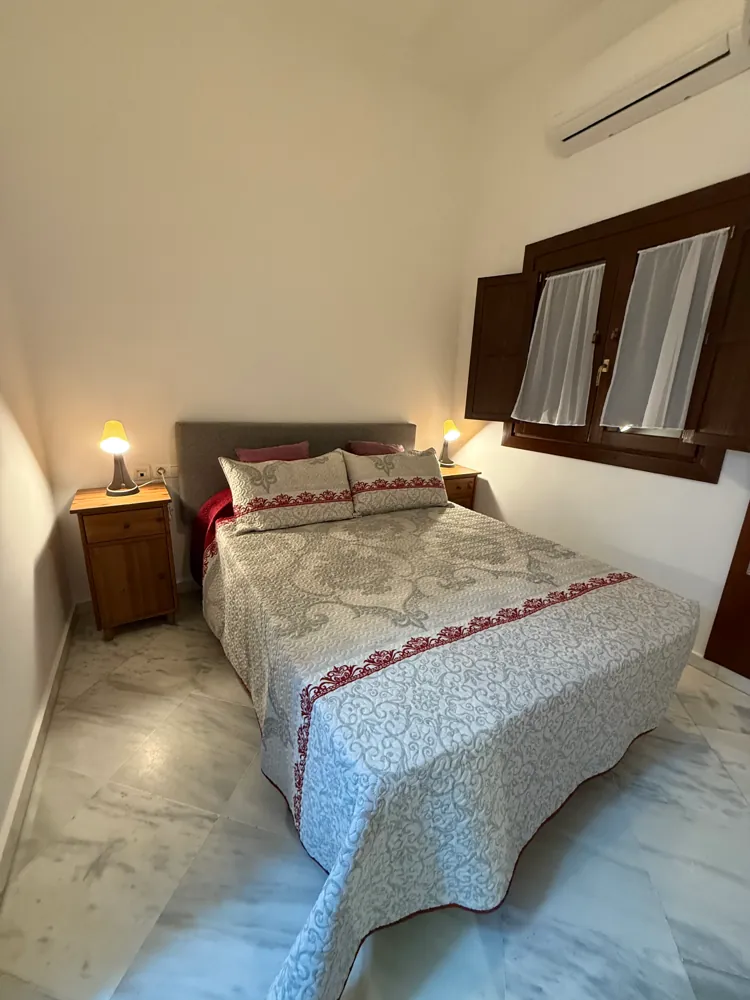

Landscape framing, natural light and a well-made bed. Cushions and textiles were added in this photo: if you propose changes like these, the real flat has to match them.
Want to know what your listing is missing?
Send us your Airbnb or Booking link. Within 24 hours we’ll tell you, point by point, what we’d change in your photos, copy and pricing, and how much you could earn. Free, no commitment.
Frequently asked questions
Does Airbnb penalise me for declining bookings or blocking dates?
Airbnb says that more open dates make it more likely your listing matches what guests search for, and that cancellation rate and responsiveness are part of the hosting standards it considers. Blocking dates isn't a penalty, but it reduces the searches you can appear in.
How long does it take for changes to show?
Changes to the cover, title and price show up in clicks within days. Regaining position depends on those clicks turning into bookings and reviews, so allow several weeks. Always measure over at least 30 days.
Does Instant Book improve my ranking?
According to Airbnb, listings that can be booked instantly may rank higher because responses are automatic. You can turn it on with guest requirements, such as having positive reviews from previous stays.
Should I lower my price if I'm not getting bookings?
Only if the diagnosis confirms it. If you're losing impressions and your total price is above comparable listings, adjusting it makes sense. If guests see you but don't click, or click but don't book, the problem is presentation and a lower price won't fix it.
Does Booking.com work the same way?
The logic is similar: Booking.com gives a lot of weight to conversion, price, cancellations, how complete the property page is and the review score. It also personalises results for each traveller, so two guests may see different orders.
Sources
- Airbnb Help Centre. How search results work.
- Airbnb Resource Centre. How search works on Airbnb.
- Airbnb Help Centre. Understanding performance data for conversion.
- Airbnb Resource Centre. Understanding Guest Favorites.
- Airbnb Newsroom (21 April 2025). Total price display is now standard for guests worldwide.
- Booking.com for Partners. Basics for improving ranking.
- Chekin. Booking.com ranking: how to improve your visibility on Booking.
Reviewed on 25 September 2026. Platforms change their criteria often, so always check their help pages.